HomeWordPress AI manager

WordPress AI manager

New Meet the AI site manager for WordPress 7.0+

Run your WordPress site by chat.
Approve every change.

WordPress AI manager is an AI agent inside your WordPress admin. Ask in plain language and it builds pages, writes posts and SEO, creates contact forms, manages WooCommerce products, backs up your site and puts routine upkeep on a schedule. You review each proposal, apply it in one click and undo it just as fast.

  • Pages
  • Posts & SEO
  • Contact forms
  • WooCommerce
  • Backups
  • Scheduled tasks
  • Undo
Read the documentation
What do you want to do on your site today?
Try
Pick an example to see what WP AI Manager does with it.

Works with the plugins and AI providers you already use

The WP AI Manager Home screen, shown with example activity.

12Guided playbooks on day one
8Task recipes with preview-first runs
3SEO plugins: Rank Math, Yoast, Slim SEO
3Risk levels: Auto, Ask and Block

●  Product tour

The daily site work, handled in one place

Chat for one-off jobs, playbooks for common ones, tasks for the routine. Every change lands in a history you can roll back.

AI Chat

Describe the change. Watch it happen step by step.

The agent reads your pages, drafts the change and shows each step as it works. Small edits run straight away with an Undo button. Anything broad or destructive pauses on an approval card that shows the exact change first.

  • Edits any Elementor or block editor page you can edit
  • Live step labels, so you always know what it is doing
  • Undo on every result, right in the conversation
AI Chat Smart model
Add a 5-question FAQ to the Services page, matching our brand voice.
✓Read page structure · Services
✓Checked brand voice in Site Knowledge
•Waiting for your approval
Approval neededAdd FAQ section to “Services”add-widget · accordion · 5 items after: “Our process” section
ApproveEdit request
Ask for a page, an edit or a fix…Send
Playbooks

Twelve proven starting points, one click away.

Start from a guided playbook instead of a blank prompt. Write a blog post, build a landing page, apply your brand colors, fix broken links or put a category on sale. Each one asks the right questions first, and you can duplicate any playbook to make it your own.

  • Launch from Home, Chat or the WordPress command palette
  • Tells you up front if a playbook needs a plugin you don’t have
Tasks

Routine upkeep, previewed before anything changes.

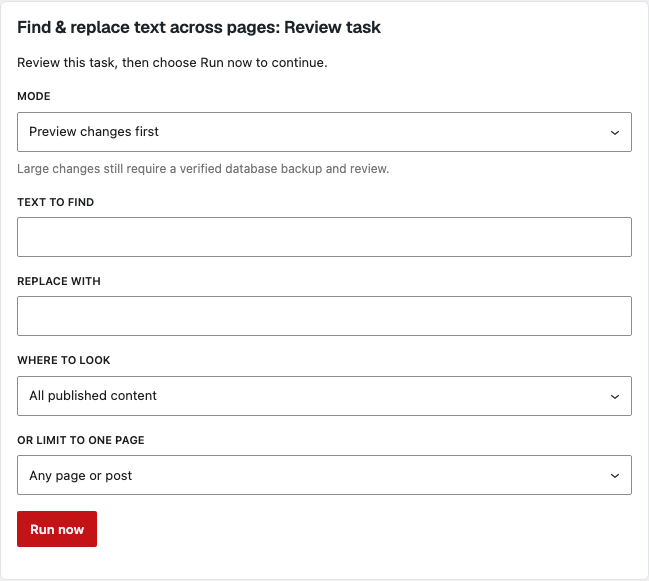
Tasks handle the chores that pile up: missing SEO titles, image alt text, find-and-replace across every page, 404 redirects and site health checks. In preview mode they stage proposals in a table. Tick the ones you want and apply only those.
  • Run now or put it on a schedule with an email summary
  • Large changes still require a verified backup first
  • Searches builder content as well as page text
Find and replace task review form with mode set to Preview changes first, fields for text to find and replace, and a Run now button.
Proposals · 3 of 4 selected
PageChange
Home2025 2026
Pricing2025 2026
Footer© 2025 © 2026
Blog postSkip: quoted date
Preview only. Nothing applied yet.Apply selected
History & Undo

Every change on record. Every change reversible.

Each write goes into a change ledger with where it came from: a chat, a task or a direct admin edit. Roll back a single change from the result itself, or open History and undo anything in one click.

  • Recent changes sit on Home next to your chats and task runs
  • A clear trail to hand over to a client or editor
History Today
Chat

Added FAQ section to ServicesElementor · 5 items · 10:42

Undo
Task

Alt text on 23 imagesMedia Library · 09:15

Undone ✓
Task

SEO titles for 6 pagesRank Math · 09:02

Undo
Admin

Coupon FALL20 expiredWooCommerce · 08:30

Undo

●  Features

Everything a site manager needs, built into WordPress

No separate dashboard and no hosted service. WP AI Manager works through the same tools your admin screens use.

Approval rules built in

Three risk levels decide what runs alone. Small edits run with Undo, broad or destructive changes wait for you, and anything off-limits is blocked.

SEO that uses your SEO plugin

Write titles, descriptions and focus keywords straight into Rank Math, Yoast or Slim SEO. The plugin you already run is detected automatically.

WooCommerce, safely in bulk

Change prices and stock, run a category sale, create or expire coupons and get a store summary. Bulk changes always show a dry run first.

Inside the editor you know

An AI assistant panel sits inside Elementor and the block editor, so you can ask for changes without leaving the page you are editing.

Scheduled tasks

Put upkeep on a schedule and get an email summary after each run. If a required plugin goes missing, the run is skipped and you are told why.

Your AI provider, your key

Connect your own provider through a WordPress AI Connector. Pick a strong model for chat and a cheaper one for tasks. Nothing is hosted by us.

Knows your brand

Save your colors, fonts, tone and audience once. Every draft uses them, and a drawer in chat shows exactly what the AI knows about your site.

Contact forms in one request

Ask for a form and it is built with the forms plugin you already use, Contact Form 7, Fluent Forms, WPForms or MetForm, then placed on the page you choose.

Backups before big changes

Create a verified database backup on demand or on a schedule, or a full-site backup when UpdraftPlus is installed. Large changes require one first.

Broken links and 404s

Find internal links that point to missing pages and get suggested redirects for recent 404s, ready to approve.

Command palette shortcuts

Search playbooks from the WordPress command palette and start one from anywhere in the admin.

Advanced: external MCP access

For developers, one switch lets MCP clients such as Claude Desktop or Cursor drive the site. It stays off unless you turn it on.

●  From conversation to WordPress

Your words in. Reviewed changes out.

Three examples of how site owners, stores and agencies use it. Each one follows the same loop: ask, review, apply.

For site ownersExample

Refresh a page in minutes

“Update our opening hours on every page and add a holiday notice to Contact.”

  1. Finds every mention across pages and builder content.
  2. Shows a proposal table so you tick what to change.
  3. Applies and records it in History, ready to undo.
For WooCommerce storesExample

Launch a weekend sale

“Put the winter range on 25% off until Sunday and create a WINTER25 coupon.”

  1. Runs a dry run on every product in the category.
  2. Pauses on an approval card with the exact price changes.
  3. Applies on approval. Undo restores every price.
For agenciesExample

Brief to landing page draft

“Build a landing page for the spring offer from this brief, in our brand colors.”

  1. Reads your brand kit and the brief you paste.
  2. Builds a draft page in Elementor or the block editor.
  3. Hands it to an editor with a clear trail of what changed.

Illustrative examples. Results depend on your site, plugins and AI model.

●  Control & safety

An assistant with clear limits

WP AI Manager acts with your permissions and inside rules you can read. Some things it will not do at all.

  • Change payment or shipping settings, or issue refunds
  • Export customer personal data
  • Run custom code without a sandbox and your explicit approval
  • Raise its own permissions or act as another admin
Auto

Runs right awaySingle-element edits and SEO writes. Each one shows an Undo button.

Ask

Waits for your approvalBuilding pages, deleting content, bulk WooCommerce changes and user changes.

Block

Never runsAny tool outside the list allowed for that conversation.

Ledger

Always recordedEvery write is logged with its source and can be rolled back.

●  FAQ

Good questions to ask first

Requirements

WordPress
7.0 or newer
PHP
8.1 or newer
AI
A WordPress AI Connector and your provider key
Optional
Elementor, WooCommerce, Rank Math, Yoast or Slim SEO
Setup guides and docs
Does it replace my page builder?

No. It works alongside the tools you already use. It edits Elementor and block editor pages directly, and builder-specific features appear when that builder is installed.

Can I review work before it goes live?

Yes. Broad or destructive changes wait on an approval card, tasks can run in preview mode, and blog posts are created as drafts. Every applied change can be undone.

Is an AI subscription included?

No. You connect your own AI provider through a WordPress AI Connector plugin, such as OpenAI, Anthropic, Google or OpenRouter, and you pay that provider directly for usage.

What if I don’t like a change?

Click Undo on the result in chat, or open History and roll back any change. History includes changes made in chat, by tasks and directly in the admin.

Does it work with WooCommerce?

Yes. It can update prices and stock, run category sales, create and expire coupons, assign categories and summarize your store. Bulk changes always run as a dry run first. It never touches payments, shipping, refunds or customer data exports.

Can I see it on my own site first?

Yes. Explore the product tour above to see how the workflow looks, then choose Buy Now when you're ready.

●  Get started

Your next site update starts with a sentence.

Bring one page idea or one task you repeat every week. We will show you the whole loop running on WordPress: ask, review, apply, undo.

WordPress 7.0+Bring your own AI keyUndo on every change